| Environment variable | Default | Recommended |
|---|---|---|
| PHP\_MAX\_INPUT\_VARS | 4000 | Must be > 2000 for real work allocation screen |
| PHP\_REQUEST\_TERMINATE\_TIMEOUT | 0 | Must not end requests on timeout to let cron run without ending |
| PHP\_MAX\_EXECUTION\_TIME | 30 | 30 is minimum advised |
| PHP\_MEMORY\_LIMIT | 512M | 512M is minimum advised for PDF generation |
| Name | Default | Usage |
|---|---|---|
| PJT\_DB\_TYPE | mysql | Database type. Can be mysql or pgsql |
| PJT\_DB\_HOST | 127.0.0.1 | Database host (server name) |
| PJT\_DB\_PORT | 3306 | Database port |
| PJT\_DB\_USER | root | Database user to connect |
| PJT\_DB\_PASSWORD | root | Database password for user |
| PJT\_DB\_NAME | projeqtor | Database schema name |
| PJT\_DB\_PREFIX | ***empty*** | Database prefix for table names |
| PJT\_SSL\_KEY | ***empty*** | SSL Certificate key path |
| PJT\_SSL\_CERT | ***empty*** | SSL Certificate path |
| PJT\_SSL\_CA | ***empty*** | SSL Certificate CA path |
| PJT\_ATTACHMENT\_MAX\_SIZE\_MAIL | 2097152 | Max file size in email |
| PJT\_LOG\_LEVEL | 2 | Log level {'4' for script tracing, '3' for debug, '2' for general trace, '1' for error trace, '0' for none} |
| PJT\_ENFORCE\_UTF8 | 1 |
| Extension | Usage |
|---|---|
| qd | For reports graphs |
| imap | To retrieve mails to insert replay as notes |
| mbstring | Mandatory. for UTF-8 compatibility |
| mysqli | For default MySql database |
| pgsql | If database is PostgreSql |
| pdo | BDD connector |
| pdo\_mysql | For default MySql database |
| pdo\_pgsql | If database is PostgreSql |
| openssl | To send mails if smtp access is authentified (with user / password) |
| ldap | Directory Access Protocol, and is a protocol used to access "Directory Servers" |
| zip | ZipArchive class is mandatory to manage plugins and export to Excel format |
This stack is for Docker Swarm, if you want to run it on simple docker compose, you must replace `overlay` in network definition by `bridge`
```yaml version: '3.8' services: mysql_service: image: mysql:latest volumes: - mysql_data:/var/lib/mysql networks: - projeqtor_network environment: - MYSQL_ROOT_PASSWORD=changeme - MYSQL_DATABASE=projeqtor projeqtor_service: image: nospy/projeqtor:latest depends_on: - mysql_service volumes: - projeqtor_documents:/mnt/documents - projeqtor_logs:/mnt/logs ports: - "25:25" - "80:80" networks: - projeqtor_network environment: - PHP_MAX_EXECUTION_TIME=30 - PHP_MAX_INPUT_VARS=4000 - PHP_MAX_UPLOAD_SIZE=1G - PHP_MEMORY_LIMIT=512M - PHP_REQUEST_TERMINATE_TIMEOUT=0 - PJT_ATTACHMENT_MAX_SIZE_MAIL=2097152 - PJT_DB_TYPE=mysql - PJT_DB_HOST=mysql_service - PJT_DB_PORT=3306 - PJT_DB_NAME=projeqtor - PJT_DB_USER=root - PJT_DB_PASSWORD=changeme volumes: mysql_data: projeqtor_documents: projeqtor_logs: networks: projeqtor_network: driver: overlay attachable: true ``` # Pnpm [Docker Hub](https://hub.docker.com/r/nospy/pnpm) [Github](https://github.com/Nouuu/pnpm-docker) Fast, disk space efficient package manager: * **Fast.** Up to 2x faster than the alternatives (see [benchmark](#benchmark)). * **Efficient.** Files inside `node_modules` are linked from a single content-addressable storage. * **[Great for monorepos](https://pnpm.io/workspaces).** * **Strict.** A package can access only dependencies that are specified in its `package.json`. * **Deterministic.** Has a lockfile called `pnpm-lock.yaml`. * **Works as a Node.js version manager.** See [pnpm env use](https://pnpm.io/cli/env). * **Works everywhere.** Supports Windows, Linux, and macOS. * **Battle-tested.** Used in production by teams of [all sizes](https://pnpm.io/users) since 2016. ## Background pnpm uses a content-addressable filesystem to store all files from all module directories on a disk. When using npm or Yarn, if you have 100 projects using lodash, you will have 100 copies of lodash on disk. With pnpm, lodash will be stored in a content-addressable storage, so: 1. If you depend on different versions of lodash, only the files that differ are added to the store. If lodash has 100 files, and a new version has a change only in one of those files, `pnpm update` will only add 1 new file to the storage. 1. All the files are saved in a single place on the disk. When packages are installed, their files are linked from that single place consuming no additional disk space. Linking is performed using either hard-links or reflinks ( copy-on-write). As a result, you save gigabytes of space on your disk and you have a lot faster installations! If you'd like more details about the unique `node_modules` structure that pnpm creates and why it works fine with the Node.js ecosystem, read this small article: [Flat node_modules is not the only way](https://pnpm.io/blog/2020/05/27/flat-node-modules-is-not-the-only-way). ## Benchmark pnpm is up to 2x faster than npm and Yarn classic. See all benchmarks [here](https://r.pnpm.io/benchmarks). Benchmarks on an app with lots of dependencies: 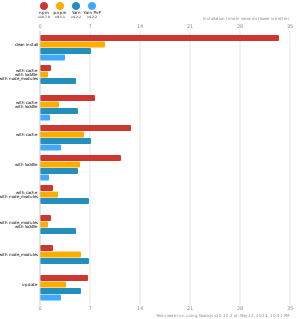 ## Dependencies and volume mapping ### Docker volume mapping [https://pnpm.io/npmrc#node-modules-settings](https://pnpm.io/npmrc#node-modules-settings) | Container location | Description | |---------------------------------|------------------------------------------------| | `/root/.local/share/pnpm/store` | The pnpm store module location is on | | `/root/.local/share/pnpm/store` | The pnpm global store location `pnpm i -g ...` | ### Config [https://pnpm.io/npmrc](https://pnpm.io/npmrc#node-modules-settings) The pnpm config command can be used to update and edit the contents of the user and global .npmrc files. The four relevant files are: - per-project configuration file (/path/to/my/project/.npmrc) - per-workspace configuration file (the directory that contains the pnpm-workspace.yaml file) - per-user configuration file (~/.npmrc) - global configuration file (/etc/npmrc) ## Benchmark on real project We ran some tests on local computer to check performance of pnpm with shared volume containers and various projects With dependencies : ```json { "dependencies": { "@angular-extensions/elements": "~12.6.0", "@angular-extensions/model": "^10.0.1", "@angular/animations": "~12.2.6", "@angular/cdk": "~12.2.6", "@angular/common": "~12.2.6", "@angular/compiler": "~12.2.6", "@angular/core": "~12.2.6", "@angular/forms": "~12.2.6", "@angular/material": "~12.2.6", "@angular/platform-browser": "~12.2.6", "@angular/platform-browser-dynamic": "~12.2.6", "@angular/router": "~12.2.6", "@fortawesome/angular-fontawesome": "^0.7.0", "@fortawesome/fontawesome-free": "^5.15.1", "@fortawesome/fontawesome-svg-core": "^1.2.32", "@fortawesome/free-brands-svg-icons": "^5.15.1", "@fortawesome/free-solid-svg-icons": "^5.15.1", "@ngrx/effects": "~12.0.0", "@ngrx/entity": "~12.0.0", "@ngrx/router-store": "~12.0.0", "@ngrx/store": "~12.0.0", "@ngrx/store-devtools": "~12.0.0", "@ngx-translate/core": "^13.0.0", "@ngx-translate/http-loader": "^6.0.0", "bootstrap": "^5.0.1", "browser-detect": "^0.2.28", "rxjs": "~6.6.3", "tslib": "^2.2.0", "uuid": "^8.3.1", "zone.js": "~0.11.4" }, "devDependencies": { "@angular-devkit/build-angular": "~12.2.6", "@angular-eslint/eslint-plugin": "~12.0.0", "@angular/cli": "~12.2.6", "@angular/compiler-cli": "~12.2.6", "@angular/language-service": "~12.2.6", "@commitlint/cli": "^11.0.0", "@commitlint/config-conventional": "^11.0.0", "@types/jasmine": "~3.6.0", "@types/node": "^14.14.7", "@types/uuid": "^8.3.0", "@typescript-eslint/eslint-plugin": "^4.7.0", "@typescript-eslint/eslint-plugin-tslint": "^4.7.0", "@typescript-eslint/parser": "^4.7.0", "all-contributors-cli": "^6.19.0", "assert": "^2.0.0", "codelyzer": "^6.0.0", "eslint": "^7.13.0", "eslint-config-prettier": "^6.15.0", "eslint-plugin-import": "^2.22.1", "express": "^4.16.4", "husky": "^4.3.0", "jasmine-core": "~3.6.0", "jasmine-spec-reporter": "~5.0.0", "karma": "~6.3.2", "karma-chrome-launcher": "~3.1.0", "karma-coverage": "~2.0.3", "karma-jasmine": "~4.0.0", "karma-jasmine-html-reporter": "^1.5.0", "karma-spec-reporter": "^0.0.32", "npm-run-all": "^4.1.5", "postcss": "^8.3.6", "prettier": "^2.1.2", "pretty-quick": "^3.1.0", "protractor": "^7.0.0", "raw-loader": "^4.0.2", "rimraf": "^3.0.2", "standard-version": "^9.3.0", "ts-node": "~9.0.0", "tslint": "~6.1.3", "typescript": "~4.2.4", "webpack": "^5.51.1", "webpack-bundle-analyzer": "^4.1.0" } } ``` `pnpm install` - First launch with empty store : 50s - First launch with filled store : 18s - Second launch with `pnpm-lockfile.yml` and filled store : 10s - Other second launch with `pnpm-lockfile.yml` and empty store : 40s